Important Things you should know
50 mile Cut-off
18hrs | Sunday 12:30 am
13.1 Mile Cut-off
12hrs | Sunday 12:30 am
Race Week
Friday | September 18thPacket Pickup
Come to pick up everything needed to start the race. Get your questions awnsered and meet others that will join you on this adventure! Maybe even find a Running partner.
Time3-6 pm
Packet pickup: Presque Isle: Porcupine Pavilion Location Coordinates: 46.7050556, -89.9748611
Parking at Porcupine Mountain
Vehicles need a Michigan Department of Natural Resources parking pass for anyplace you park in the Porucpine Mountain Wilderness State Park. You will need cash to buy at front gate.

Saturday | September 19th | Central Time for all times listed on website. The race course is within two time zonesThere is very little cell service anywhere in the park.
Race Day
50 mile runners start and finish in same location
Presque Isle Parking lot
GPS coordinates: 46.7050556, -89.9748611
Shuttle Pickup for Half Marathon Runners. Bib pickup available here.
Bus leaves at 10:50 am
Shuttle bus from finish line to Lake Eddy Park schedule:
4:00 pm
6:00 pm
8:30 pm
We believe runners will be done by then. If you come in after that we will drive you back.
Central Time
Saturday, Lake Eddy Park, 300 Eddy Park Rd, Wakefield, MI
50mi Race Start TimeSATURDAY 6:30 AM START UPDATE
Since we were able to add a trail loop at the beginning of the race that had previously been closed, we are moving the start time to 6:30 AM.
This loop takes you past a beautiful waterfall, and we want it to be light enough for you to actually see it and enjoy it!
New Start Time: Saturday at 6:30 AM
Finish line food:
Sub sandwiches, chips, and cookies. They will be in the Porcupine Pavillion.
Drinks:
Coffee, hot cider, and various drinks.
13.1mi Race Start TimeSaturday 12:00pm Noon
Expect no cell service
Attention Crew, Runners, and Volunteers: You will not have cell service in the Porkies. This means that your phone will not work to navigate you to any place you are driving or using phone for navigation.
Before you arrive to the area you need to download maps to work offline. Here is directions.
Google Maps
Open the Google Maps app while connected to Wi-Fi or mobile data.
Tap your profile picture in the top right corner.
Select Offline maps from the menu.
Tap Select your own map.
Pinch to zoom in or out to cover the area you want to save.
Tap Download.
Not Registered Yet?
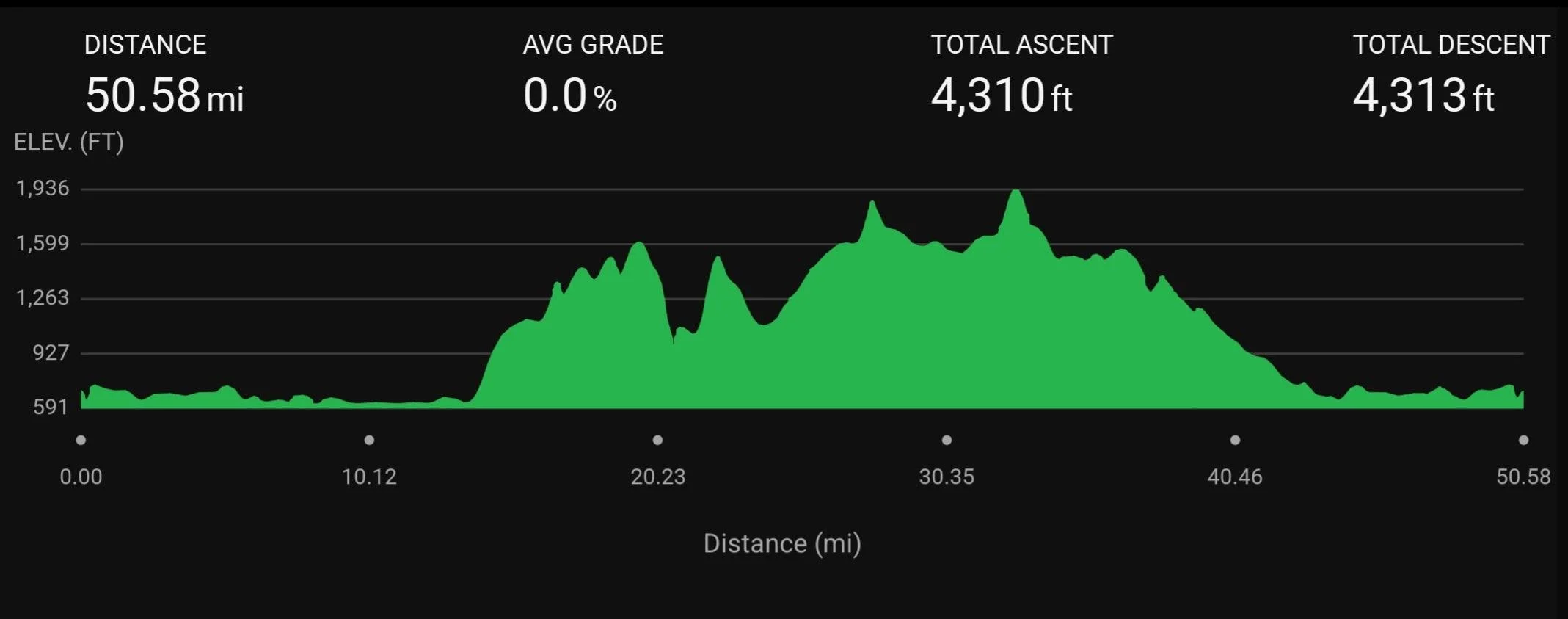
Full Course Over View
We made a Print out sheet with Aid Station information that can be helpful for both runners and crew!
want to Volunteer?